
Every call to a large language model is billed in tokens, not words or characters. For teams running agents on Azure AI Foundry, understanding how tokens are counted, priced and capped is the difference between a predictable bill and a surprise invoice. This guide breaks down what a token actually is, how input, output and cached tokens are billed differently, and how Foundry's quota system is a separate mechanism from cost altogether.
What is a token?
A token is a chunk of text, roughly 4 characters or about three quarters of an English word. Models don't read words, they read tokens. Take the sentence "Draft a kickoff summary for ENG-0016." Split into tokens it becomes: Draft, a, kick, off, summary, for, ENG, -, 00, 16, and the period, which is 11 tokens for 6 words. The exact split depends on the model's tokenizer, so treat this as an illustration rather than a fixed rule.

Three kinds of billed tokens
Every request has up to three token counts, and each is priced differently.
- Input tokens: the prompt you send, plus the full conversation history the model needs to see
- Output tokens: the reply the model writes
- Cached input tokens: input the provider has already seen and stored, such as a repeated system prompt or earlier turns, billed at a steep discount
Why output costs more than input
Writing text takes more computation than reading it. Generating the next token depends on everything that came before it, so the work has to happen one step at a time. Reading existing tokens, by contrast, can be processed in parallel. That difference in computational cost is why output tokens are typically billed at several times the input rate.
Long conversations also get more expensive turn by turn, for a separate reason: there is no persistent memory inside the model. Every new turn re-sends the full conversation history as input, so by turn ten you are paying to re-read turns one through nine as well as write a new reply. The conversation is not getting smarter or cheaper per turn, it is getting longer, and the whole thing is re-read every time.
The pricing formula and a worked example
Cost is calculated per million tokens, with each token type at its own rate:
cost = (input_tokens x rate_in + output_tokens x rate_out + cached_tokens x rate_cache) / 1,000,000
With made-up rates of $3 per million input tokens, $15 per million output tokens and $0.30 per million cached tokens, a request with 1,800 input tokens and 600 output tokens and no cache hit costs: (1,800 x 3 + 600 x 15) / 1,000,000 = (5,400 + 9,000) / 1,000,000 = $0.0144. Scale that to a long reply, say 224 input tokens and 37,878 output tokens, and the bill is about $0.57, almost all of it from output. Output volume, not input, is usually what drives the cost.
Azure AI Foundry quota: TPM and RPM
A Foundry model deployment has a quota: tokens per minute (TPM) and requests per minute (RPM) it is allowed to process. Quota has nothing to do with money, it is a rate cap on how fast you can call the model. Go over it and nothing extra gets charged. Instead the request is rejected with an HTTP 429 error until the rate drops back under the limit.
A useful way to hold the two ideas apart: cost is a taxi meter, it ticks up with every token used and never stops you, it just keeps charging. Quota is a motorway speed limit, it does not care how far you have travelled or how much you have spent, only how fast you are going right now. Go too fast and you get pulled over, not billed extra.
Three ways to cut token cost
- Shorter prompts: trim system instructions, drop irrelevant history, summarize old turns instead of re-sending them in full
- Caching: if the same prefix repeats across calls, such as a system prompt or long context, cached input tokens bill at a fraction of the normal input rate
- A cheaper model for easy work: route simple classification, extraction or formatting tasks to a smaller model and reserve the expensive one for genuinely hard work
Cost and quota are two independent controls. Cost tracks total money spent and never stops you on its own; quota caps how fast you can call a deployment and returns a 429 the moment you cross it. Getting the most out of Azure AI Foundry means managing both: watch token usage to control spend, and size deployment quota to match the traffic you actually send.
Example: a real engagement-level cost breakdown
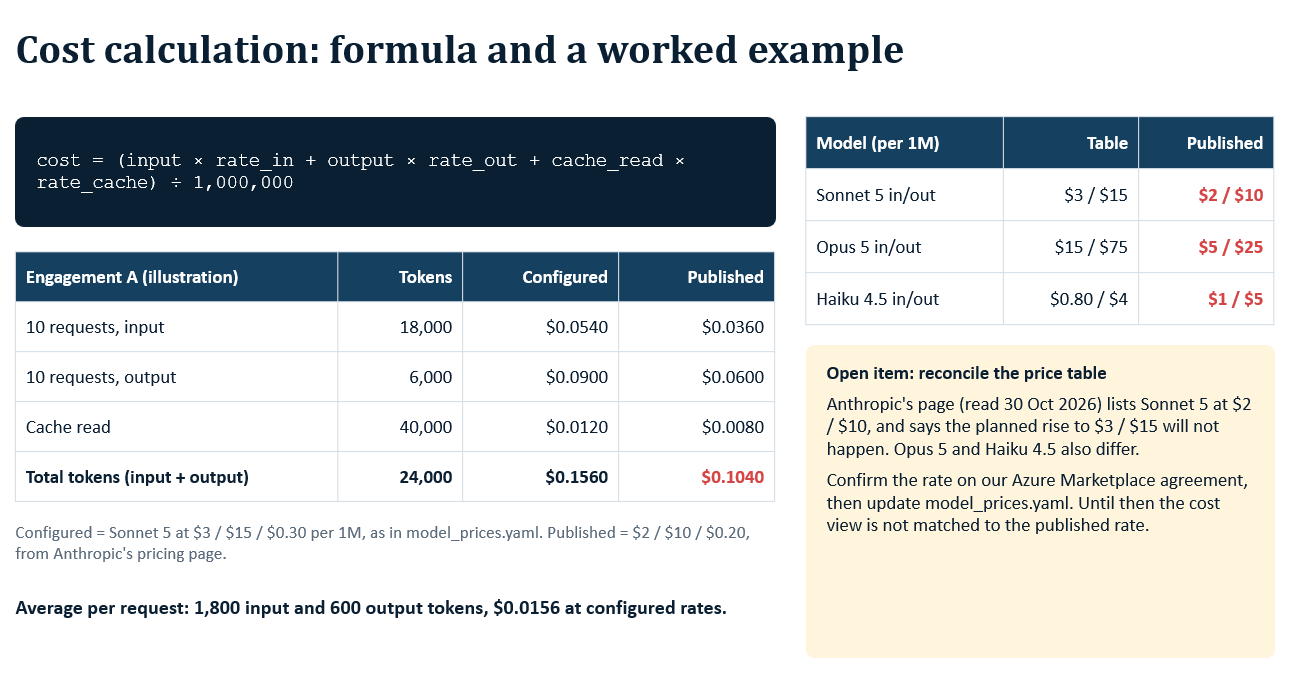
The formula plays out differently once real usage is tallied against two different rate cards: the rates configured in the system versus the rates a provider has actually published. Here is one engagement's token usage over 10 requests, priced both ways.
Input, 10 requests, 18,000 tokens: $0.0540 at configured rates, $0.0360 at published rates
Output, 10 requests, 6,000 tokens: $0.0900 configured, $0.0600 published
Cache read, 40,000 tokens: $0.0120 configured, $0.0080 published
Total (input + output), 24,000 tokens: $0.1560 configured, $0.1040 published
Configured rates come from the system's internal pricing config. Published rates are what the provider's own pricing page states. The gap between the two columns above is exactly that discrepancy, and it is the reason a cost dashboard should be checked against the provider's published numbers periodically, not trusted blindly.
Model pricing, configured vs published, per million tokens (in/out): Sonnet 5 at $3/$15 configured versus $2/$10 published. Opus 5 at $15/$75 configured versus $5/$25 published. Haiku 4.5 at $0.80/$4 configured versus $1/$5 published.
Open item: the configured rates in this system do not match what is currently published. Confirm the correct rate on the Azure Marketplace agreement, then update the pricing config. Until that is done, the cost view above should be read as an estimate, not an invoice.
References
- Manage Azure OpenAI in Microsoft Foundry quota
https://learn.microsoft.com/en-us/azure/ai-foundry/openai/how-to/quota - Azure OpenAI in Foundry Models quotas and limits
https://learn.microsoft.com/en-us/azure/ai-foundry/openai/quotas-limits - Prompt caching - Azure OpenAI
https://learn.microsoft.com/en-us/azure/ai-foundry/openai/how-to/prompt-caching - Anthropic pricing
https://docs.claude.com/en/docs/about-claude/pricing